V-GATE vLinker MC+ Bluetooth 4.0 OBD II / OBD2 Interface Diagnostic Scanner & Coding Tool for all makes incl. Audi Mercedes BMW VW
V-GATE vLinker MC+ Bluetooth 4.0 OBD II / OBD2 Interface Diagnostic Scanner & Coding Tool for all makes incl. Audi Mercedes BMW VW
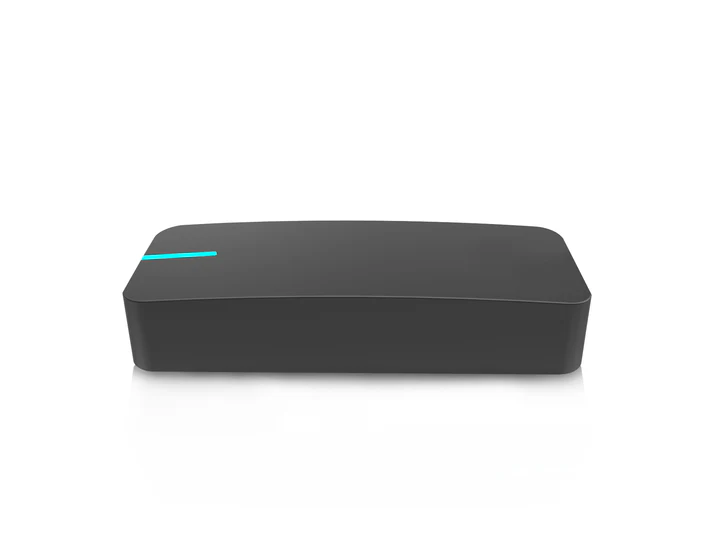
Vgate vLinker MC 4.0 OBD2 Auto Diagnostic Scanner
The Vgate vLinker MC 4.0 Bluetooth OBD2 Auto Diagnostic Scanner turns your smartphone, tablet, or computer into a full vehicle diagnostic interface. Plug it into your car’s OBD-II port and use Bluetooth or compatible apps to read and clear engine trouble codes, view real-time data, and diagnose issues without paying for workshop scans. It supports a wide range of apps on both Android and iOS (with proper Bluetooth connection procedures), and is designed to work with most standard and extended OBD-II protocols for global car compatibility.
Features
-
Reads and clears diagnostic trouble codes (DTCs) and check engine light data.
-
Displays real-time vehicle sensor data such as RPM, speed, temperature, fuel trims, and more.
-
Bluetooth 4.0 connectivity for Android and iOS devices (follow app-specific pairing instructions).
-
Supports all standard OBD-II protocols plus extended protocols (GMLAN, HS/MS-CAN for Ford/GM).
-
Supports user-defined commands and firmware updates.
-
Works with Windows devices when used with compatible software.
Platform Compatibility
-
Android devices (Bluetooth connection requires searching “vLinker MC” or “vLinker MC-Android” in some apps).
-
iOS devices (connect inside the app; do not pair in phone settings).
-
Windows laptops and tablets with compatible software.
Compatible Apps
Works with many third-party diagnostic and coding apps. Some apps may require purchase or subscription. Confirmed compatible apps include:
Android Apps
-
Torque (Lite / Pro)
-
FORScan
-
Car Scanner ELM OBD2
-
JScan
-
OBD Auto Doctor
-
Auto Doctor
-
DashCommand
-
Carista
-
TrackAddict
-
Dr. Prius
-
GaragePro
-
BimmerCode (Android)
-
Additional apps that support standard ELM327/OBD interfaces
iOS Apps
-
BimmerCode
-
BimmerLink
-
OBD Fusion
-
Car Scanner ELM OBD2
-
FORScan
-
OBD Auto Doctor
-
DashCommand
-
TrackAddict
-
inCarDoc
-
GaragePro
Some advanced features (like module coding in BimmerCode/BimmerLink) may require in-app purchases. App support and features vary by vehicle model and software.
How It Works
-
Plug the scanner into your vehicle’s OBD-II port (usually under dashboard).
-
Turn the ignition key to ON (engine off).
-
Enable Bluetooth on your mobile device.
-
Open your chosen diagnostic app and follow the app’s connection instructions to connect to the vLinker MC.
Compatibility Notes
-
iOS devices must connect to the scanner through the app, not via Bluetooth device settings.
-
Advanced app features like coding may not be free and require app-specific subscriptions.
Package Includes
-
1 × Vgate vLinker MC 4.0 OBD2 Bluetooth Diagnostic Scanner
-
1 × User Manual (downloadable per brand instructions)
Original: $96.54
-65%$96.54
$33.79
Description
Vgate vLinker MC 4.0 OBD2 Auto Diagnostic Scanner
The Vgate vLinker MC 4.0 Bluetooth OBD2 Auto Diagnostic Scanner turns your smartphone, tablet, or computer into a full vehicle diagnostic interface. Plug it into your car’s OBD-II port and use Bluetooth or compatible apps to read and clear engine trouble codes, view real-time data, and diagnose issues without paying for workshop scans. It supports a wide range of apps on both Android and iOS (with proper Bluetooth connection procedures), and is designed to work with most standard and extended OBD-II protocols for global car compatibility.
Features
-
Reads and clears diagnostic trouble codes (DTCs) and check engine light data.
-
Displays real-time vehicle sensor data such as RPM, speed, temperature, fuel trims, and more.
-
Bluetooth 4.0 connectivity for Android and iOS devices (follow app-specific pairing instructions).
-
Supports all standard OBD-II protocols plus extended protocols (GMLAN, HS/MS-CAN for Ford/GM).
-
Supports user-defined commands and firmware updates.
-
Works with Windows devices when used with compatible software.
Platform Compatibility
-
Android devices (Bluetooth connection requires searching “vLinker MC” or “vLinker MC-Android” in some apps).
-
iOS devices (connect inside the app; do not pair in phone settings).
-
Windows laptops and tablets with compatible software.
Compatible Apps
Works with many third-party diagnostic and coding apps. Some apps may require purchase or subscription. Confirmed compatible apps include:
Android Apps
-
Torque (Lite / Pro)
-
FORScan
-
Car Scanner ELM OBD2
-
JScan
-
OBD Auto Doctor
-
Auto Doctor
-
DashCommand
-
Carista
-
TrackAddict
-
Dr. Prius
-
GaragePro
-
BimmerCode (Android)
-
Additional apps that support standard ELM327/OBD interfaces
iOS Apps
-
BimmerCode
-
BimmerLink
-
OBD Fusion
-
Car Scanner ELM OBD2
-
FORScan
-
OBD Auto Doctor
-
DashCommand
-
TrackAddict
-
inCarDoc
-
GaragePro
Some advanced features (like module coding in BimmerCode/BimmerLink) may require in-app purchases. App support and features vary by vehicle model and software.
How It Works
-
Plug the scanner into your vehicle’s OBD-II port (usually under dashboard).
-
Turn the ignition key to ON (engine off).
-
Enable Bluetooth on your mobile device.
-
Open your chosen diagnostic app and follow the app’s connection instructions to connect to the vLinker MC.
Compatibility Notes
-
iOS devices must connect to the scanner through the app, not via Bluetooth device settings.
-
Advanced app features like coding may not be free and require app-specific subscriptions.
Package Includes
-
1 × Vgate vLinker MC 4.0 OBD2 Bluetooth Diagnostic Scanner
-
1 × User Manual (downloadable per brand instructions)